Consider a pilot build. A smart glasses camera works on the bench. The technician routes the flex cable, fits the temple cover and opens the glasses to their normal wearing position. The picture freezes. The inspection record has one entry: “Camera passed.” Which step would you repeat first?
For an OEM preparing a pilot build, smart glasses functional testing should follow the same unit through three stages: on the bench, in the frame before sealing, and after final assembly. Use the production camera and flex at each stage. A buyer can then ask suppliers to quote the same checks, and an engineer can see when the fault first appeared.
Why can a smart glasses camera fail when the hinge moves?
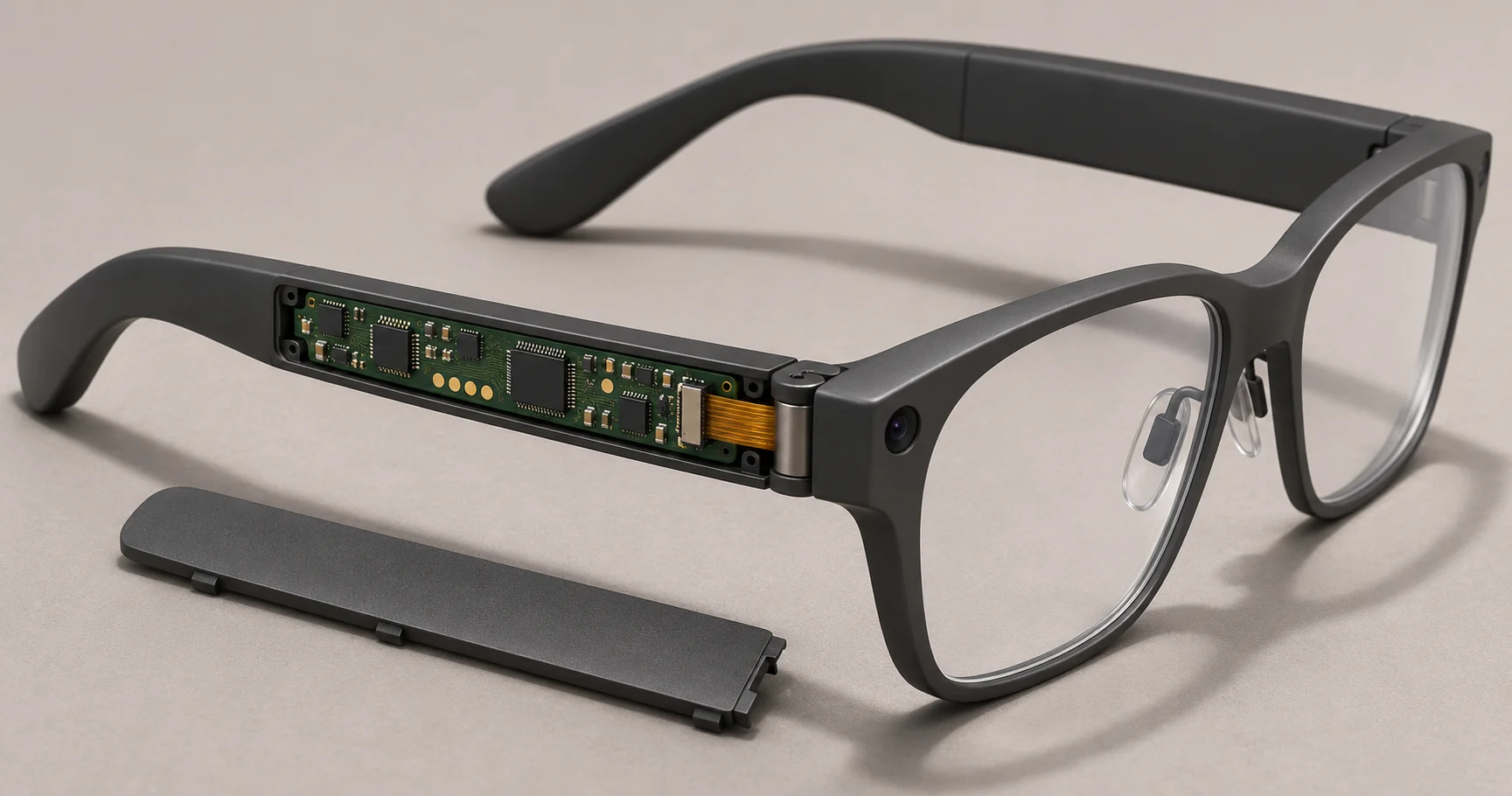
On some designs, the camera and the processor sit on opposite sides of a moving joint. Cable routing, connector seating and clearance under the cover all change what the assembled camera experiences. In iFixit’s Oakley Meta HSTN teardown, camera ribbon cables pass through the hinge area. Opening the bonded housing also risks cosmetic damage. That makes the moment just before sealing a particularly useful time to run a live check.
Start by confirming which hinge positions the product specification says must support recording. A deliberate sleep transition when the glasses are folded needs a different test. If the picture drops within the active range, note the angle and direction of travel before disturbing the connector. That gives the next technician a repeatable starting point.
Where should the camera be tested during assembly?
1. On the bench. Connect the production board, camera and flex. Record the firmware revision and verify that the camera delivers fresh frames. A running counter or moving target in the field of view makes a frozen frame visible. A sharp picture of a stationary chart can remain on screen even after the stream has stopped.
2. In the frame, before sealing. Route the flex as specified and repeat the same check while opening and closing the temple through the agreed active range. If the stream first drops here, inspect the connector latch, the routing near the hinge and any tension at the failing angle. Record what you found before reseating anything.
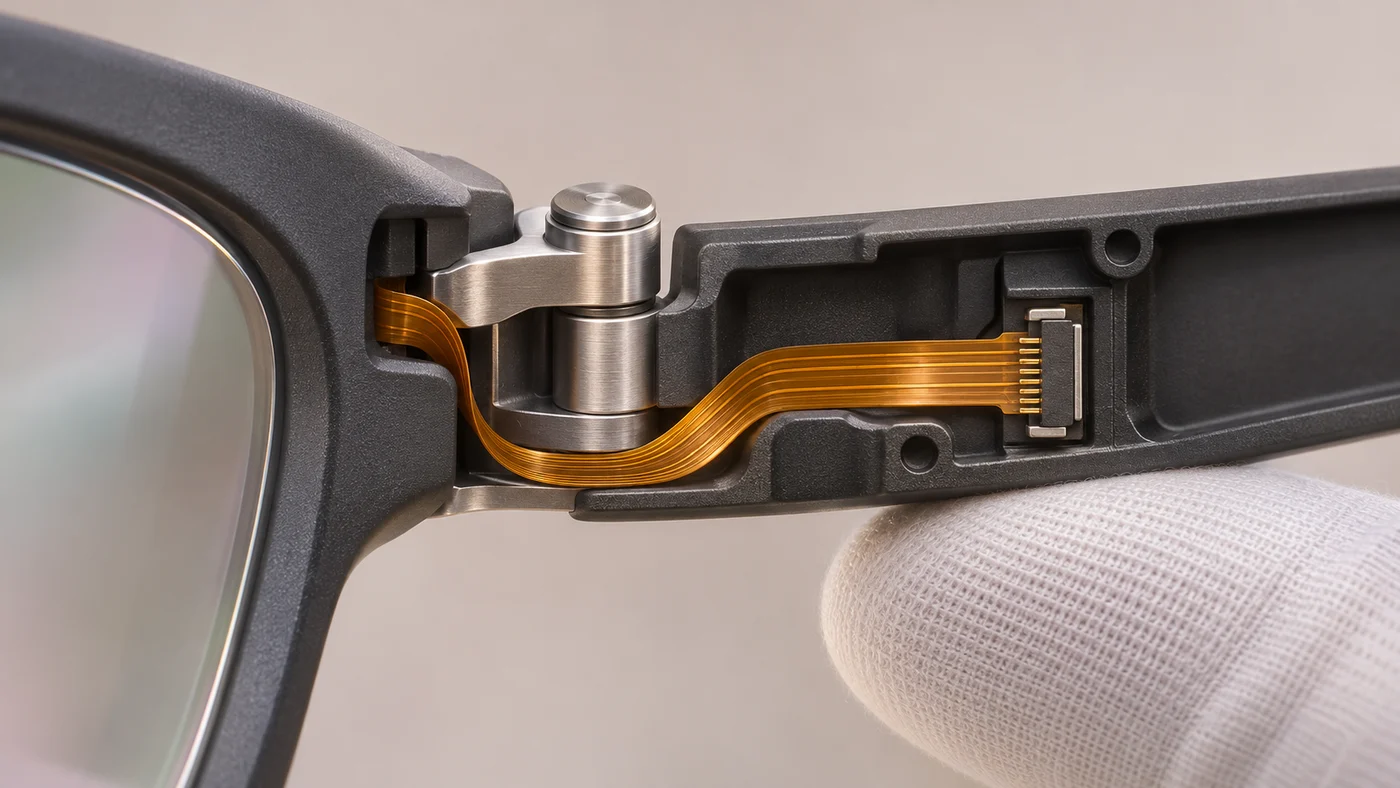
3. After fitting the cover. Run the check again on the same unit with the specified fasteners or bonding process complete. If only this stage fails, examine cover clearance and contact marks first. For a product that records to local storage, save a clip and play it back. A passing preview alone does not tell the buyer whether a usable file was saved.
Keep the unit serial number, hardware and firmware revisions, assembly stage, observation and retest result together. Agree separately whether the build requires optical measurements such as focus or field of view. Imatest describes where those measurements enter the camera module and finished-device test process. VOSNOR’s PCBA testing and inspection capabilities are a starting point for agreeing board-level coverage and fixture requirements.
Three recording questions buyers should turn into acceptance criteria
How long can smart glasses record video?
A maximum clip length and the total recording time per charge are two different numbers. For example, Ray-Ban’s UK smart glasses FAQ lists 30-second, 60-second and 3-minute clip settings for supported models. These are limits per clip. For your own product, define the required clip duration, resolution, frame rate and storage conditions. Run the full clip on pilot units, play it back and check that the final seconds are present. Specify a shorter end-of-line check separately if that is what the unit price covers.
How long does the battery last while recording?
Ray-Ban lists up to eight hours per charge for its Meta Gen 2 glasses. That figure alone does not tell you how long the camera can record. Define a workload the buyer can reproduce. For example, start with a fully charged pair, use a specified camera mode and ambient temperature, record clips at agreed intervals, and log elapsed time until the specified shutdown point. State whether the glasses may recharge in their case during the test. Quote this longer validation by sample size, separately from a brief power and charging check on every unit.
How can someone tell when smart glasses are recording?
The signal depends on the design. Ray-Ban describes an outward-facing capture LED on its camera glasses. On a design with this feature, check the indicator from outside the finished frame during start, recording and stop. A technician seeing an LED illuminate on an exposed board will not catch a misaligned light guide or an obscured window. Have the product owner define the expected behavior, viewing angles and lighting conditions.
What should an OEM include in a smart glasses testing RFQ?
Two suppliers can both offer “100% functional testing.” One may connect each PCBA to a reference camera and confirm that the firmware recognizes it. Another may check the installed camera in every finished pair while the hinge moves. The difference is the deliverable and the time spent on each unit. Define who installs the camera and closes the frame when deciding between turnkey PCB assembly and box build.
RFQ wording you can adapt
Quote a live camera check on every unit with its production camera and flex installed, once before sealing and again after final assembly. Use the hinge positions and maximum permitted video interruption defined in our test specification. Record results against the unit serial number. Itemize fixture setup, per-unit testing, sampled recording-runtime validation and retest charges. State who reviews failures found after the housing has been sealed.
Before comparing prices, ask each supplier for a sample result sheet. Look for separate entries for the open-frame and finished-unit checks. If the permitted dropout, recording workload or rework responsibility is still open, flag it for the pilot-build and NPI review before ordering fixtures. A brief hinge sweep on each unit and a hinge-life test over many cycles answer different questions and should be quoted separately.
Preparing a wearable PCBA pilot build? Send the board or BOM revision, expected quantities, an assembly drawing showing the camera and flex path, and any test limits already agreed. Identify who supplies the camera module and frame, and whether the requested delivery is an assembled board or a tested unit. Discuss your assembly and test requirements with VOSNOR.